September 1st, 2026
New
Improved
Fixed
New 🎉 - Beacons make their debut in the app
This new version introduces a new feature, "Beacons" (Les balises font leur apparition dans l'application. (Bêta)), which you can read about in a previous article. To summarize, you can add beacons during your trips and attach a note to them to help you on your next trip. Your caregivers can also add beacons from the platform to flag an obstacle or a helpful tip during your trips with SonarVision.
Comfort of use for the RTK device
When navigating with RTK, heading is now calculated the same way as navigation using the camera. This means the phone can be held with the camera facing up, down, in landscape mode, or even flat.
Navigation is no longer interrupted after a loss of internet connection (loss of RTK precision), but only when accuracy is no longer sufficient to ensure precise guidance. This avoids interrupting guidance as soon as the internet connection drops in rural areas or on hiking trails, as accuracy usually remains sufficient for several minutes.
UX improvements for our users
For our visually impaired users and caregivers, we have added maps to easily view the locations of various places featured in the app.
We have improved the navigation interface by increasing button sizes in VoiceOver mode, making them easier to locate when searching across the screen.
Bug fixes
The instruction
Aligned with the crossingwas not always announced correctly.The
Create a new addressbutton from the starting or ending point of a trace did not appear when an associated street address could not be generated. (This typically occurred on traces recorded during a hike).
November 3rd, 2025
Improved
Fixed

New features and improvements
Pre-guidance warnings
Pre-guidance warnings (low battery and night mode) have been redesigned to be displayed after the destination has been selected and before the scan stage. Previously, these warnings were displayed at the same time as the scan stage, which could cause confusion, particularly with VoiceOver. In addition, they will only be displayed once per hour at most to avoid being displayed as soon as guidance is started. Pre-guidance warnings can also be disabled in the “Navigation” section of the app settings.
Distance display
Distances in the application will now be displayed using the unit of measurement specified by the user in their phone settings.
Bug fixes
Confirmation dialogs no longer displayed the “Cancel” buttons since iOS 26.
In certain very specific cases, the app could select a route that crossed to the opposite sidewalk even though a route existed on the sidewalk where the user was located.
Sometimes, the instruction issued by the reassurance button was followed very quickly by the same instruction.
October 7th, 2025
Improved
Fixed

New features and improvements
Sonarvision now includes a new settings page for voice configuration.
You can choose from all the voices installed on your iPhone and adjust the speed, volume, and pitch to personalize how instructions are read aloud.
This update follows a bug introduced by Apple in recent iOS versions, which temporarily prevents apps from automatically using the VoiceOver voice selected in your system settings.
While waiting for Apple to fix this issue, Sonarvision now gives you full control over the voice used for navigation guidance.
Bug fixes
Fixed an issue that could prevent Sonarvision from selecting the shortest itinerary when generating an automatic route.
Fixed a bug where the initial distance and reassurance messages were not announced during bird’s-eye guidance.
Fixed a bug when adding an address via scan, where the “Add” button did not always update the interface correctly, sometimes leading to duplicate address creation.
Improved address search and addition, especially when the device has no internet connection, and corrected minor typos.
September 1st, 2025
Improved
Fixed

This new patch brings various fixes aimed at improving the user experience.
Trace Consolidation
Several improvements have been made to enhance the user experience of this feature.
The trace is now temporarily saved locally. This makes it possible, in the event of a crash or after accidentally quitting the app, to resume the ongoing recording.
During recording, we prevent the app from going into sleep mode. Otherwise, the recording would be paused when the phone locks. (In the future, we hope to allow users to lock their phone when using a location mode that does not require the camera.)
The page for creating a new place from the end of a trace had a bug. When the user pressed the “Create a new place” button, the interface did not respond, but the place was still created by the server. This led users to press the button multiple times, resulting in duplicate places being created. This issue has now been fixed.
RTK Consolidation
Connecting to the Ardusimple RTK module was complicated due to a bug within the module itself. We have implemented a workaround to bypass the issue, making the user experience smoother for those using an Ardusimple RTK.
Opening the App to All iPhones
The app is now available on older iPhones. The only requirement is to have iOS 16 or later installed.
Since Apple VPS is not available on all iPhones, we previously limited access to the app to prevent compatibility issues. Now that we have implemented Google VPS, which has broader compatibility, we can offer the app to all iPhones running iOS 16.
July 17th, 2025
New
Improved
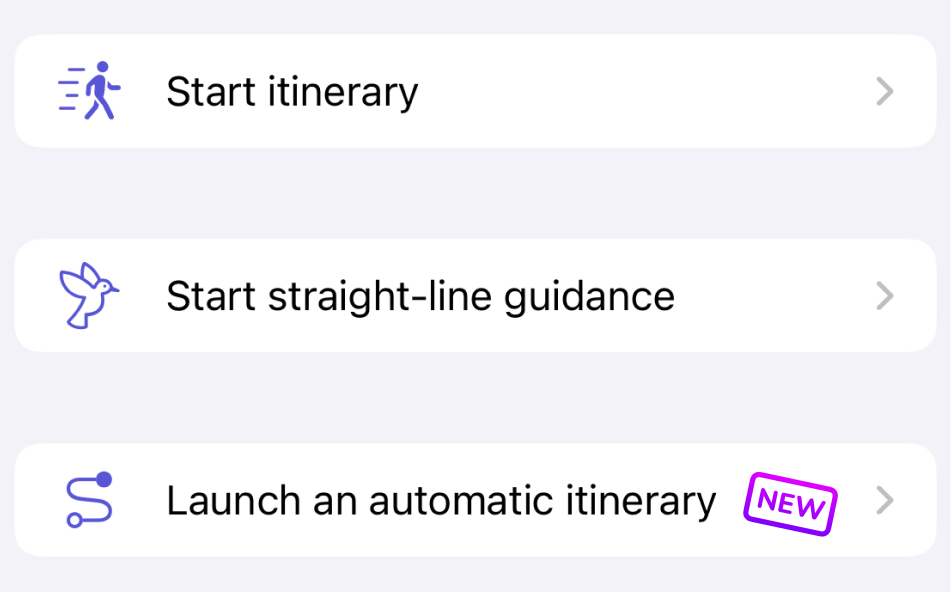
We made it happen: it is now possible to launch automatic itineraries to your destinations, with no prior preparation. This is a major step forward for Sonarvision users! In just a few seconds, you can get a route to your destination, generated directly from the available pedestrian mapping in your area.
⚠️ Automatic itineraries are not yet a full replacement for prepared routes: if no pedestrian map is available for the requested area, a route cannot be generated automatically.
To better understand the use cases, benefits, and limitations of this feature, check out the full article: Trajets Automatiques
Using a Route Before It Has Been Verified
Up until now, when a user requested a route, they had to wait for a planner to verify it before it could be used. From now on, if the automatic generation is successful, the route can be used immediately – even before being reviewed.
The request is still sent to a planner for later verification, but the user can start their itinerary without delay. A message will clearly inform them that the route is based on automatic generation and has not yet undergone human validation.
This change brings greater reactivity and flexibility to the daily use of Sonarvision.
Backend Infrastructure Upgrade
We have migrated our servers to more powerful and modern instances. This upgrade aims to provide a faster, smoother, and more stable experience for all users. An example : no more long waits during address creation!
A more technical article about this migration will be published soon for those interested in the details.
Thank you for your trust and precious feedback 🙏
December 1st, 2024

Major Improvements
Enhanced the route editing interface to avoid repeated clicks on "Edit," "View," and "Save" buttons.
Map Features
The map now centers on displayed elements after loading.
Added a new route calculator that works across all of France.
To request additional countries, visit:
https://feedback.sonarvision.fr/p/add-itinerary-router-for-other-countriesImproved response times for route calculators.
Solo Mode
The check boxes on the left no longer hide an element but instead display it on the screen on its own. Multiple elements can now be soloed simultaneously.
Instructions and Map Interaction
You can now click on an instruction icon on the map to highlight the instruction in the list, and vice-versa.
Fixed incorrect distances in instructions.
Map Sorting
Elements on the map are now sorted as follows:
At the top, the place(s) you are currently viewing (e.g., "Your Home").
Next, all routes originating from this place (e.g., all routes from "Your Home" to other places).
Additional Improvements
Improved display to indicate whether a metro entrance is entry-only or exit-only.
Enhanced button labels and translations for better clarity.
New improved design for settings.
Corrected rendering problems for small screens.
Corrected accessibility issues.